
Western Digital Color Guide: Choose the Right HDD by Color for Your Needs
In the world of storage devices, Western Digital (WD) has long been a trusted brand, and its western digital color-coded hard disk drive (HDD) series is a game-changer for users seeking tailored storage solutions. Whether you’re a home user, a professional, a small business owner, or an enterprise IT manager, understanding the meaning behind each Western Digital color can help you pick the perfect HDD that matches your performance, reliability, and usage needs. Let’s dive into the details of WD’s color-coded HDD lineup and why choosing by color matters.
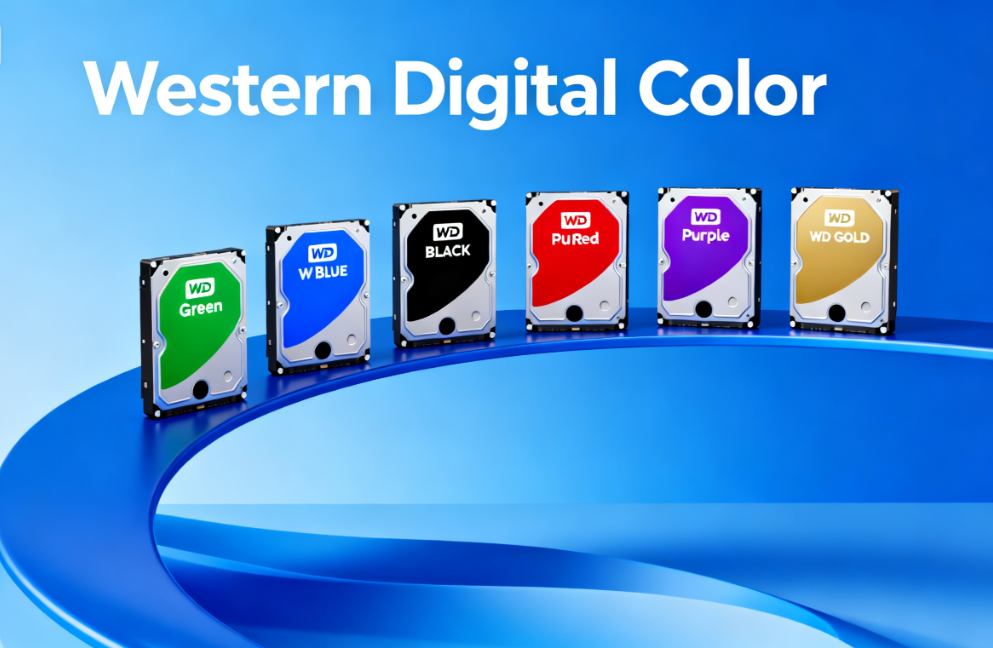
An Overview of Western Digital Color-Coded HDD Series
Western Digital’s color classification isn’t just for aesthetics—each hue represents a specific set of features, performance levels, and intended use cases. From energy-efficient home storage to enterprise-grade 24/7 operation, there’s a WD color designed for every scenario.
WD Green – Eco-Friendly Storage for Home Use
As the name suggests, WD Green is Western Digital’s environmentally friendly HDD option. Built with low power consumption in mind, it’s an ideal choice for users who prioritize energy efficiency, especially for long-term storage tasks like home file servers or download disks. Even as capacity increases, WD Green maintains reasonable power usage, making it cost-effective for continuous, low-intensity operation. If you need a reliable “background” storage drive for movies, music, or backup files, WD Green’s eco-friendly design won’t disappoint.
WD Blue – Balanced Performance for Daily Computing
WD Blue is the jack-of-all-trades in the Western Digital color lineup. With well-rounded performance and a long service life, it’s tailored for everyday computing needs. Whether you’re using a desktop, laptop, or all-in-one PC, WD Blue delivers consistent read/write speeds and versatile storage capacities to handle documents, photos, streaming, and light multitasking. It’s the go-to choice for home users, students, and office workers who need a reliable drive without extreme performance demands—practicality at its finest.
WD Black – High-Speed Powerhouse for Professionals
For users craving top-tier performance, WD Black is the standout in the Western Digital color series. As WD’s high-performance mechanical HDD, it boasts excellent speed, large cache, and a spindle speed of 7200RPM across all models (ranging from 500GB to 6TB). With a 5-year warranty, it’s built for heavy-duty use: think enterprise servers, high-throughput applications, multimedia video editing, photo processing, and high-performance gaming PCs. Professionals and power users who demand fast data transfer and consistent performance will find WD Black more than capable.
WD Red – NAS-Optimized Drives for 24/7 Operation
WD Red (and Red Plus) is Western Digital’s color-coded solution for NAS (Network-Attached Storage) environments. Specifically designed for home or small-to-medium business NAS systems with 1-5 drive bays, it features NASware 3.0 technology that ensures seamless compatibility and reliability in 24/7 operation. Whether you’re sharing files across a home network, running a small office server, or backing up data centrally, WD Red’s optimized firmware and durability make it the perfect fit for NAS setups.
WD Purple – Reliable Storage for Surveillance Systems
When it comes to security monitoring, WD Purple is the Western Digital color you can trust. Built exclusively for surveillance systems, it offers large storage capacities (1TB to 12TB) and 24/7 continuous operation compatibility. Most models run at 5400RPM for energy efficiency, while 10TB and 12TB variants feature 7200RPM for faster data capture—ideal for recording multiple camera feeds without dropped frames. If you’re setting up a home security system or a commercial surveillance network, WD Purple’s tailored design ensures reliable, non-stop storage.
WD Gold – Enterprise-Grade Solutions for Data Centers
For small business data centers and enterprise-level storage needs, WD Gold is the premium Western Digital color option. Engineered to handle 24/7 continuous data access, writing, and transfer, it’s built to meet the rigorous demands of mission-critical applications. Whether you’re managing customer data, hosting servers, or running cloud storage services, WD Gold delivers the durability, performance, and scalability that enterprises require to keep operations running smoothly.
Why Western Digital Color Matters for Your Storage Needs
Choosing the right Western Digital color isn’t just about preference—it’s about aligning your HDD with how you use it. Here’s why the color code is a crucial factor:
Match Performance to Usage Scenarios
Each Western Digital color is optimized for specific tasks. A WD Black drive will waste energy in a home NAS setup, while a WD Red drive will struggle with gaming or video editing. By choosing by color, you ensure your HDD delivers the performance you need without overkill or bottlenecks.
Avoid Overpaying for Unneeded Features
High-performance drives like WD Black or WD Gold come with a higher price tag. If you only need basic storage for documents or downloads, a WD Green or WD Blue drive will save you money while meeting your needs. The color code simplifies budgeting by clearly separating entry-level, mid-range, and premium options.
Ensure Long-Term Reliability
WD’s color-coded drives are built with their intended use cases in mind. For example, WD Purple and WD Gold are tested for 24/7 operation, while WD Blue is optimized for daily on/off use. Choosing the right color ensures your drive is durable enough to handle its workload, reducing the risk of failures and data loss.
Tips for Choosing the Perfect Western Digital Color HDD
To make the right choice, ask yourself these questions:
What will you use the drive for?
Daily computing (WD Blue), gaming/editing (WD Black), NAS (WD Red), surveillance (WD Purple), enterprise (WD Gold), or home storage (WD Green).
Do you need 24/7 operation?
Opt for WD Red, Purple, or Gold—these drives are designed for non-stop use.
How much performance do you need?
For speed, go with 7200RPM models (WD Black, high-capacity WD Purple/Gold); for efficiency, choose 5400RPM (WD Green, WD Blue, base WD Purple).
What’s your budget?
Start with WD Green/Blue for affordability, move to WD Red/Purple for specialized use, and invest in WD Black/Gold for premium performance.
If you want to dive deeper into technical specs, compatibility, and detailed comparisons between each Western Digital color, check out this comprehensive guide: What are the differences between the different colors of Western Digital HDD? It’s packed with insights to help you make an informed decision.
Western Digital’s color-coded HDD series takes the guesswork out of choosing storage. Whether you’re a casual user, a professional, or an enterprise, there’s a western digital color that aligns with your needs—from eco-friendly WD Green to enterprise-grade WD Gold. By understanding the purpose behind each hue, you can select a drive that delivers the right balance of performance, reliability, and value. Don’t settle for a one-size-fits-all storage solution—let Western Digital’s color code guide you to the perfect HDD!